What an AI calorie counter is
An AI calorie counter is an app that estimates the calories, protein, carbs and fat in a meal from a photo. Instead of searching a food database and scrolling past forty versions of “chicken,” you point your camera at the plate and let computer vision do the work. What used to take two minutes per meal now takes about five seconds, and that speed is the whole point, because the biggest predictor of weight-loss success isn't a perfect log. It's still logging in week six.
Photo, picture, image or camera, the same tool under four names
Worth saying early, because people use all four names and are not sure they have found the right thing. A photo calorie counter, a picture calorie counter, an image calorie calculator and a food calorie calculator camera all describe the same method: you point a phone at a meal, a model identifies what is on the plate, estimates the portion, and returns calories and macros.
There is no technical difference between them. The names came from how people describe the action rather than from anything the apps do differently, which is why any of them turns up the same handful of products. If you are comparing, the questions that actually separate them are the ones below: what it does with portion size, whether it shows a confidence figure, and whether correcting it is a single tap or a menu.
How the photo becomes a number
- Recognition. A vision model identifies what's on the plate, grilled salmon, rice, cucumber, a sauce.
- Portion estimation. The model judges quantities from visual cues: plate size, food height, how much of the plate each item covers.
- Nutrition math. Each recognized food is matched to nutrition data and the portions are converted into calories and macros.
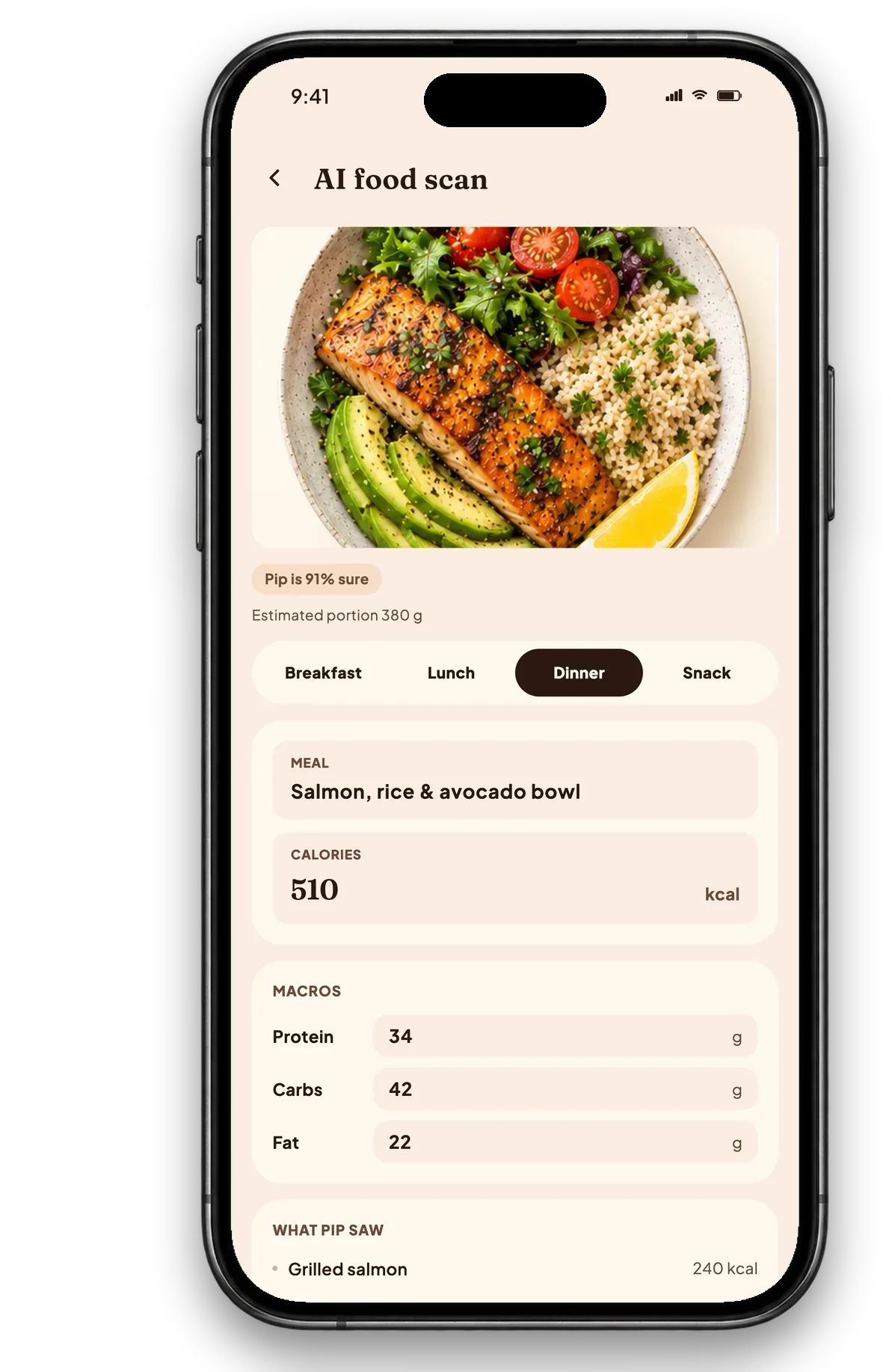
- Confidence. Good scanners tell you how sure they are. In Calfit every scan carries a confidence score, a “92% sure” bowl is safe to accept, while a low-confidence estimate gets a visible nudge to check it.
How accurate is calorie counting from a photo?
Honest answer: close enough for weight loss on most everyday meals, and not perfect. Simple plates (a salmon bowl, eggs and toast, a salad with visible ingredients) usually land within a reasonable range of the true number. The harder cases are:
- Hidden calories: oil used in cooking, butter melted into a sauce, sugar in a dressing.
- Mixed and layered dishes: casseroles, curries, burritos, the camera can't see inside.
- Ambiguous portions: a deep bowl hides volume that a flat plate shows.
Here's the part most people miss: perfect accuracy was never the goal. Research on self-monitoring keeps finding the same thing, people who log consistently lose more weight than people who log precisely but quit. If every meal is estimated with the same method, your trend stays truthful even when a single number is off by 15%. The scale over four weeks tells you the truth; the app just has to keep you paying attention.
Rule of thumb: accept the scan when it looks sane, correct it when it doesn't, and never let one weird estimate stop you from logging the next meal. A slightly wrong log beats a skipped one, every time.
Five ways to get better scans
- Shoot from slightly above so the whole plate is visible.
- Use decent light, the model can't count what it can't see.
- Capture before you start eating (half a plate reads as half the calories).
- If a sauce or cooking oil is generous, bump the estimate up a little.
- Watch the confidence score and give low-confidence scans a two-second sanity check.
Do AI calorie counters actually work?
It depends entirely on what you are asking them to do, and the honest answer splits in two.
As a measuring instrument, no. A photo cannot see the oil in the pan, it cannot weigh the rice underneath the curry, and it cannot tell a 4% fat mince from a 20% one. Independent testing of photo based estimation across apps has generally found errors in the range of 20 to 40% on a single mixed meal, and worse on anything where the calorie load is hidden: dressings, sauces, fried food, anything assembled in a kitchen you did not stand in.
As an adherence tool, yes, and this is the part that gets missed. The comparison that matters is not photo scanning against a kitchen scale. It is photo scanning against what most people actually do, which is log carefully for nine days and then stop. Manual entry studies have repeatedly found under reporting of 20 to 30% anyway, and an abandoned food diary reports 100% wrong because it reports nothing.
So the useful framing is: a scale is more accurate per meal, a scanner is more accurate per month, because it is the one you keep using. If you are cutting for a stage or a weight class, weigh your food. For everything else, a slightly wrong number every day beats an exact number for nine days.
How the camera scan works, step by step
Ask how AI calorie tracking works and you usually get told "it uses AI", which explains nothing. The actual sequence, for Calfit and for most apps built the same way:
- Identification. A vision model looks at the image and names what it can see: grilled chicken, white rice, broccoli, a sauce it will probably call a generic dressing.
- Portion estimation. This is the hard step and the main source of error. The model judges volume from visual cues, the size of the plate, the depth of the pile, reference objects like a fork if one is in shot. There is no depth data in an ordinary photo, so this is an educated guess.
- Database lookup. Each identified item is matched to a food composition entry with calories and macros per 100 g.
- Arithmetic and a confidence score. Estimated grams times the per 100 g values, summed, with a confidence figure attached reflecting how sure the model was about the identification and the portion.
- Your correction. You adjust the portion or swap an item, and that correction is the most valuable part of the whole sequence.
The confidence figure is the feature, not decoration. An app that returns a single confident number for a photo of a stew is lying to you politely. A low confidence score is the model saying this one is worth a second look, and that is more useful than a precise looking figure with nothing behind it.
Where photo scanning fails, specifically
Knowing the failure modes is what turns a rough tool into a reliable one. In rough order of how badly they distort the number:
- Cooking fat. Invisible in a photograph and often 100 to 200 kcal a serving. The single biggest error source in home cooked food.
- Sauces and dressings. A salad can double in calories under a dressing the camera reads as a shine.
- Mixed and layered dishes. Stews, curries, casseroles, anything where most of the food is under the surface.
- Liquids. A glass of juice and a glass of squash look identical.
- Portion depth. A flat spread of rice and a heaped mound can photograph almost the same from directly above.
- Packaged food. Ironically the easiest case to get exactly right, and the one where you should use the barcode rather than the camera.
Getting a better number out of it
Small habits that meaningfully tighten the estimate:
- Shoot at an angle, not from directly overhead. An angled shot gives the model depth cues it cannot get from a flat top down photo, and portion depth is where most of the error lives.
- Get a known object in frame. A fork, a standard plate, your hand. It gives the model a scale reference.
- Photograph before you mix. Scan the components while you can still see them, not the finished bowl.
- Use the barcode for anything packaged. It is exact and the camera is not.
- Tell it about the oil. Adding the tablespoon you cooked in is a ten second correction that fixes the largest systematic error in the whole process.
- Correct the portion once and trust the pattern. If it reads your usual breakfast 30% low every time, that is a repeatable correction, and a consistent error you know about is nearly as useful as no error.
How it works in Calfit
Calfit's scanner reads your meal, returns calories plus protein, carbs and fat, and shows its confidence, all in about five seconds. If something looks off you fix it with a tap, and the meal lands in your food diary sorted by breakfast, lunch or dinner. Your calories-left number and macro rings update instantly, and Pip the hedgehog quietly marks the streak. Fast enough that you'll actually do it, honest enough that you can trust the trend. That scanner is one of eight things covered in what a calorie counter app should do.
Drinks are where photo logging needs the most help; calories in a gin and tonic shows why.
Sources
- Evaluating the quality and comparative validity of manual food logging and AI enabled food image recognition in apps for nutrition care, Nutrients, 2024
- Validity of dietary assessment methods when compared to the method of doubly labeled water: a systematic review in adults, Frontiers in Endocrinology, 2019
- Self monitoring in weight loss: a systematic review of the literature, Journal of the American Dietetic Association, 2011
- Log often, lose more: electronic dietary self monitoring for weight loss, Obesity, 2019
- FoodData Central, US Department of Agriculture, 2019
How this was made
Written by Abdullah Javaid, founder of Calfit, drafted with AI assistance and edited by hand. The accuracy ranges quoted here come from published testing of photo based food estimation and from the food diary under reporting literature, both reported as ranges, so they are given as ranges here. We build one of the apps described on this page, so the sections above say plainly where the method fails and why a kitchen scale beats it per meal. The screens are captures from the current Calfit app.